
The Course Creator Time Audit: Where Are You Losing 10 Hours a Week?


You sit down to finally work on your course; twenty-five minutes disappear replying to scheduling messages. Another twenty go hunting for last week's worksheet, buried in some folder you swore you'd rename. By the time you actually open your course platform, you're editing a video for the fourth time, tweaking a transition students will probably never notice.
Does this sound familiar? Course creators rarely lose a whole afternoon to a single dramatic block. Time leaks out in small pieces: a "quick" message here, the same explanation typed out again there, a manual reminder, an over-edited video, a lesson rebuilt from scratch because you couldn't find the original. This is where a time audit comes in: it’s more like a brief investigation into where your week actually goes, so you can win back hours for teaching, resting, or growth.
What Counts as Lost Time?
Not everything outside of live teaching is wasted time. Admin, communication, and marketing all matter. It helps to sort your week into four categories:
- Teaching and learner impact (lessons, feedback, curriculum work)
- Business growth (marketing, launches, sales conversations)
- Necessary operations (scheduling, payments, reporting)
- Time drains (duplicated work, perfectionism, unnecessary interruptions).
The audit's job is simply to help you decide what to keep, simplify, automate, or drop.
Also read: Top 5 Profitable Business Growth Course Ideas for August
The Seven-Day Time Audit
For one week, track your work in 15- or 30-minute blocks. Be specific: "rescheduled three students," not just "admin." Note whether each task was planned or reactive, and rate your energy as high, medium, or low. Then tag it with one of the four categories above.
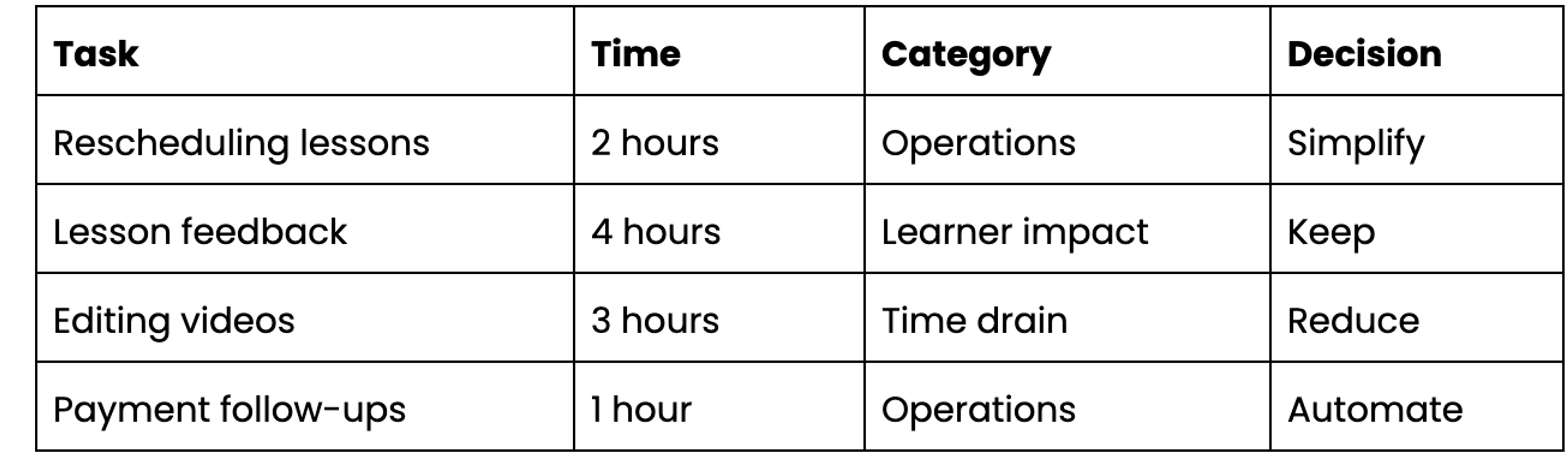
Trust the log over your memory. Most of us remember our week as more productive than it was.
The Five Biggest Time Leaks
1. Scheduling and Rescheduling
Endless message ping-pong, calendar mix-ups, and last-minute cancellations quietly eat hours. A self-booking link, recurring sessions, and a clear rescheduling policy can save an example of 1-3 hours a week. Keep some flexibility, though, especially for younger students or learners across time zones.
Also read: From Solo Tutor to 7-Figure Academy
2. Repeating the Same Communication
Welcome notes, homework instructions, payment reminders, class links- these get typed fresh every time. A small template library with placeholders for name, lesson, date, and next step keeps things fast without sounding robotic. Save real personalisation for the feedback that matters.
3. Overbuilding and Over-Editing Course Content
Trying to launch a huge, polished curriculum before anyone's tested it is a classic time sink. Start with the smallest course that delivers a real result, record in batches, and aim for clear audio over expensive production. A tight three-module workshop often serves students better than an unfinished twelve-module course.
4. Manual Learner Tracking and Reporting
Checking attendance, assignments, and progress across scattered spreadsheets and chat apps adds up fast. A single progress-tracking system, reusable feedback rubrics, and a simple monthly report template help. Platforms such as Klas can be useful here, since keeping course delivery and learner updates in one place cuts down on the spreadsheet-hopping.
Also read: 4 Strategies for Student Reactivation: Win Back 37% of Lost Learners
5. Tool-Hopping and Reactive Inbox Work
Comparing new apps, redesigning dashboards, and answering every notification the second it arrives is exhausting and rarely productive. Pick one primary tool per job, set two or three inbox windows a day, and save new tool ideas for a monthly review instead of chasing them in real time.
The Recovery Plan You Should Adopt
Rank your leaks by hours consumed, how often they happen, the stress they cause, and how easy they'd be to fix. A sample plan might look like: save 2 hours with self-booking, 1.5 with templates, 1 with scheduled reminders, 3 by batching video production, 1.5 with structured lesson notes, and 2 by fixing your admin windows. These numbers are illustrative; your own audit is the one that counts.
Also read: How to Convert Free Trial Users to Paid Students
What to Keep Human
Efficiency shouldn't flatten the teaching experience. Don't automate sensitive learner conversations, detailed academic feedback, support for a struggling student, or a worried parent's message. The point of all this isn't to remove the human parts of teaching; it's to clear away the repetitive friction so you have more energy left for them.
Conclusion
You probably don't need a whole new schedule. You need to see the pattern already hiding inside your current one. Pick one leak, test one fix for seven days, and see what happens.
If your course delivery, cohorts, or learner updates are scattered across too many places, a platform like Klas can help bring some of that under one roof.
The goal was never to squeeze more work into your week. It's to make more room for the work only you can do.


